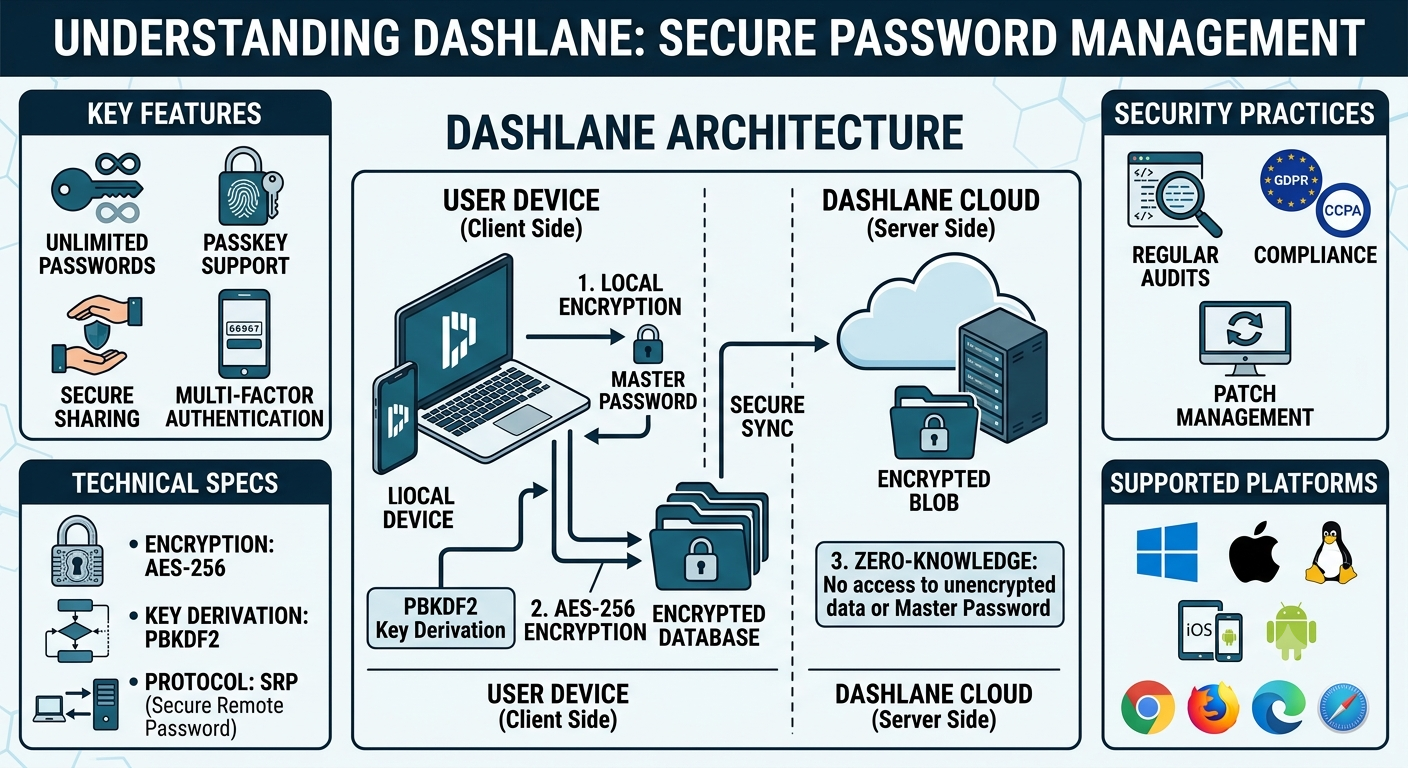
Modern credential management requires balancing cross-platform convenience with cryptographic security. Dashlane addresses this challenge through a Zero-Knowledge Architecture, a security design principle ensuring that a user’s master password and unencrypted credentials never leave their local device and are never visible to Dashlane’s servers.
To maintain this absolute privacy, Dashlane relies on multi-layered encryption, robust key derivation functions, and a unique architecture that securely syncs data across devices without exposing plain-text secrets.
1. Local Encryption and Key Derivation
The foundation of Dashlane’s zero-knowledge model is that encryption and decryption occur strictly client-side. When a user creates an account, the application requests a Master Password. Dashlane does not store this password locally or transmit it to a remote database. Instead, it serves as the foundational entropy for generating the encryption keys.
Key Derivation via PBKDF2
To protect against brute-force and dictionary attacks, Dashlane utilizes PBKDF2 (Password-Based Key Derivation Function 2) with HMAC-SHA256. The process converts the user’s master password into a strong cryptographic key:
$$K_{local} = \text{PBKDF2}(\text{Master Password}, \text{Salt}, \text{Iterations}, \text{Length})$$
- Salt: A cryptographically secure random value generated during account creation. The salt ensures that identical master passwords across different users result in entirely unique encryption keys, neutralizing rainbow table attacks.
- Iterations: Dashlane applies thousands of hashing iterations. This intentionally introduces a computational delay, making offline brute-force attacks computationally expensive and impractical for attackers.
The resulting key, $K_{local}$, is used as the Master Encryption Key (MEK) to encrypt the local database using AES-256 in Cipher Block Chaining (CBC) or Galois/Counter Mode (GCM), depending on the specific platform implementation.
2. Data Synchronization and Remote Storage
While local security protects data at rest on a specific device, a modern password manager must securely sync credentials across multiple endpoints. Dashlane achieves this by encrypting the entire credential database before transmission.
The Syncing Pipeline
- Local Changes: When a user adds a new credential, the client app modifies the local SQLite or encrypted database file.
- Encryption: The updated database fields (or the entire data payload) are encrypted using the locally derived MEK.
- Transmission: The encrypted payload, along with an account identifier and an authentication token, is sent via TLS (Transport Layer Security) to Dashlane’s cloud infrastructure.
- Storage: Dashlane stores this encrypted blob in its database. Because the data is already encrypted with the user’s MEK, the server sees only ciphertext. If a threat actor or malicious insider breaches Dashlane’s cloud storage, the retrieved data remains unreadable without the master password.
3. Device Registration and Authentication
To fetch the encrypted data blob from the cloud, a device must authenticate with Dashlane’s servers. Since the server does not know the master password, a secondary verification mechanism is required.
Two-Factor and Device Authentication
When a user logs into a new device, the following technical handshake occurs:
- SRP (Secure Remote Password) Protocol: Dashlane leverages SRP to authenticate the user to the server. SRP is a zero-knowledge password-authenticated key exchange (PAKE) protocol. It allows the client to prove to the server that it knows the master password without ever transmitting the password itself or an easily reversible hash.
- Device Tokens: Once authenticated via SRP and verified through email or an Authenticator app (2FA), the server issues a unique, cryptographically signed device token. This token authorizes that specific device to download the user’s encrypted data blob from the cloud.
4. Autofill Architecture and Sandbox Isolation
A password manager’s primary surface area for interaction is the web browser. Dashlane interfaces with web ecosystems through native applications and browser extensions.
Document Object Model (DOM) Interaction
The Dashlane browser extension monitors the DOM of web pages to identify login, registration, and checkout forms.
- Heuristic Analysis: Dashlane uses machine learning algorithms and field-attribute heuristics locally within the browser context to accurately distinguish between username, password, two-factor token, and credit card fields.
- Sandbox Isolation: Modern browsers isolate extensions within their own background processes. Dashlane’s extension communicates with the underlying native OS application (if present) via secure native messaging channels. This prevents malicious scripts running on a web page from injecting themselves into the extension’s memory space or capturing credentials during the autofill process.
5. Passkey Architecture and FIDO2 Compliance
As the industry shifts toward passwordless authentication, Dashlane has integrated support for Passkeys, which are built on the WebAuthn / FIDO2 standard. This introduces public-key cryptography to replace shared secrets entirely.
Passkey Storage and Syncing
Unlike traditional passwords, a passkey consists of a public-private key pair generated by the authenticator.
- Generation: When registering a passkey on a website, Dashlane acts as the virtual FIDO2 authenticator. It requests the generation of a unique cryptographic key pair for that specific domain.
- Public Key: The public key is sent to the website’s server for future verification challenges.
- Private Key: The private key remains inside the Dashlane ecosystem. It is encrypted locally using the user’s MEK and synced across devices using the standard zero-knowledge pipeline described above.
- Authentication: When logging in, the website issues a cryptographic challenge. Dashlane uses the stored private key to sign the challenge locally and returns the signature to the website, completing the login without transferring any sensitive data.
Technical Specifications Summary
| Component | Technical Implementation |
| Symmetric Encryption | AES-256 bit keys (GCM/CBC modes) |
| Key Derivation | PBKDF2 with HMAC-SHA256 and high iteration counts |
| Authentication Protocol | Secure Remote Password (SRP) for zero-knowledge handshakes |
| Transport Security | TLS 1.3 with strict HTTP Strict Transport Security (HSTS) |
| Passwordless Framework | FIDO2 / WebAuthn standard compliance for Passkeys |
By combining client-side AES-256 encryption with the SRP protocol and local WebAuthn key generation, Dashlane maintains a strict zero-knowledge posture. The system is architected under the assumption that the network and the cloud environment could be compromised, shifting the security boundary entirely to the user’s local hardware.
Also Read: The Complete Guide to 1Password: Security, Features, and Architecture – My Tech Blaze
Source: Dashlane: Password management & credential security platform